An intuitive writing space
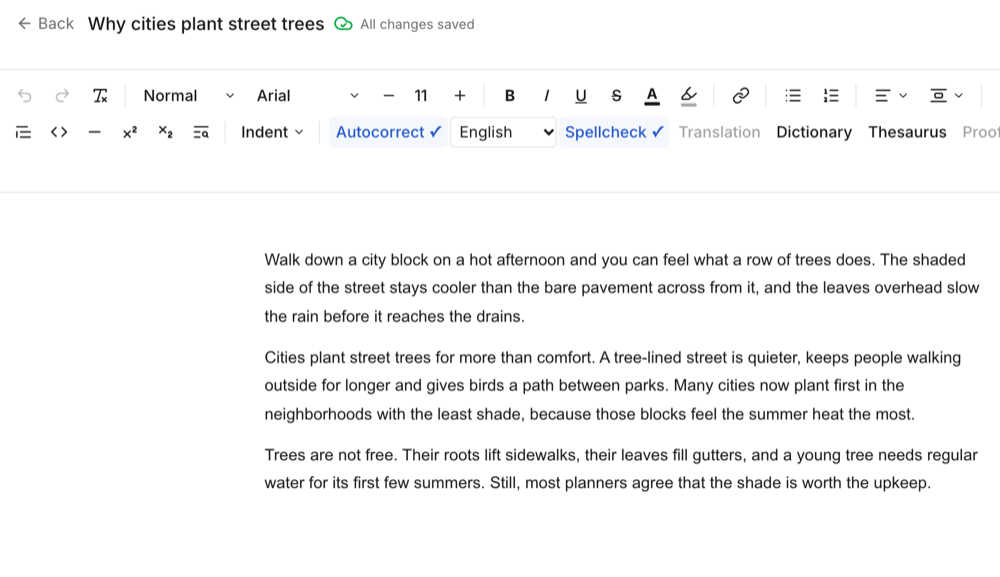
You only need to click the link and the VeriPost editor opens in your browser. It feels familiar right from the start, with the writing tools you already use.

AI detectors guess from your finished text, and sometimes they guess wrong. VeriPost records how your writing comes together, from first word to final draft, so your authorship is protected.
"52% of UK students say being accused of cheating when they did nothing wrong causes them stress."
You only need to click the link and the VeriPost editor opens in your browser. It feels familiar right from the start, with the writing tools you already use.
One click on the assignment link, a quick sign-in and the editor opens. Your work is saved as you type, with a local backup if the connection drops, so a lost tab never means a lost essay.
Headings, bold, italic, underline, strikethrough, bulleted and numbered lists, text color, highlight, alignment, line spacing, indentation, block quotes and links, with the keyboard shortcuts you already know. Accented letters and special characters work the way they do anywhere else on your computer.
Everything about the assignment sits beside your draft - the instructions, the due date, the word range, the citation style and the files your instructor attached, such as the brief and the rubric. You can check what's being asked at any moment without leaving the page.
Write in more than 30 languages, including Chinese, Japanese and Korean input. Choose your language and spellcheck follows it. VeriPost is made for students like you no matter where you are learning at.
Word count, spellcheck, autocorrect, dictionary, thesaurus, proofreading and translation, when your instructor allows them. You can see before you start which tools your assignment allows.
When your instructor allows them, Rewrite suggests another wording for texts you select, and nothing changes unless you accept it. Reverse outline gives a one-line summary of each paragraph so you can check your structure, without writing anything into your draft. Each use of a writing tool is shown in your report. Outlining and Formatting are coming soon.
Insert correctly formatted citations in six styles: APA 7, MLA 9, Chicago, Harvard, IEEE and Vancouver. Find a source by its DOI, its ISBN or a search, and your References list updates as you cite. If your instructor sets a style for the assignment, it's applied for you automatically.
Before you submit, Rubric feedback reads your saved draft against the assignment's instructions and rubric, and shows you criterion by criterion where your draft covers them and where it falls short. It never writes anything into your draft, so the work stays yours. Available when your instructor allows it.
Every saved version of your draft is kept, with its time and word count. Preview any earlier version and go back to it in one click if you change your mind.
Submitted too early, or have feedback to act on? Resubmit up to 5 times. Each submission gets its own report, and earlier versions keep theirs.
When your instructor turns it on, members in the same group submission can add notes in each other's sections. Your instructor can read the notes but doesn't add to them, and they never appear on a public page.
In a group assignment, each of you writes and submits your own section, and each section is verified on its own, so your result reflects your own writing. Your groupmates see each member's outcome and can open the full report of groupt outcome.